

Re-attribution window
The re-attribution window is the period after a user's install during which a reinstall is not counted as a brand-new install — unless it comes from a retargeting campaign. It exists so that users who remove and reinstall your app aren't double-counted as fresh acquisitions, while still letting retargeting campaigns take credit for winning a lapsed user back.
What the re-attribution window is
The re-attribution window opens when a user installs your app and runs for a duration you set (default 90 days). While it's open:
- A reinstall by the same user is not recorded as a new install and does not generate a new install postback to a media source…
- …unless the reinstall follows engagement with a retargeting campaign — in which case it's recorded as a re-attribution and reported under retargeting.
After the window ends, the next reinstall is treated as a fresh install again.
Setting the re-attribution window
- Set it on the App Settings page.
- Default: 90 days (3 months).
- Range: 1–24 months, in 30-day steps (30, 60, 90 … 720 days).
A (re)install is always evaluated against the value configured at the moment it happens, measured from the user's install. Changing the setting affects future installs and reinstalls only — it never re-classifies installs that already happened.
Example — shorten 90 → 30 days. A user installs on Sep 1; you change the window to 30 days on Sep 2. A reinstall up to Oct 1 is still a reinstall (not a new install); from Oct 2 onward it's a new install.
Example — extend 30 → 90 days. A user installs on Sep 1; you change the window to 90 days on Sep 2. A reinstall on Oct 15 is a reinstall (it's inside the now-90-day window); a reinstall on Dec 15 is a new install, because more than 90 days have passed since Sep 1.
When the window starts (and restarts)
The window is anchored to the user's most recent install, not frozen at their very first one:
- A first install starts the window.
- A new install (a reinstall after the window has ended) starts a fresh window.
- A re-attribution (a retargeting reinstall inside the window) also starts a fresh window — the user's lifecycle restarts from that attributed install.
- A plain reinstall inside the window (no retargeting) does not restart it; the original window keeps running.
Use cases
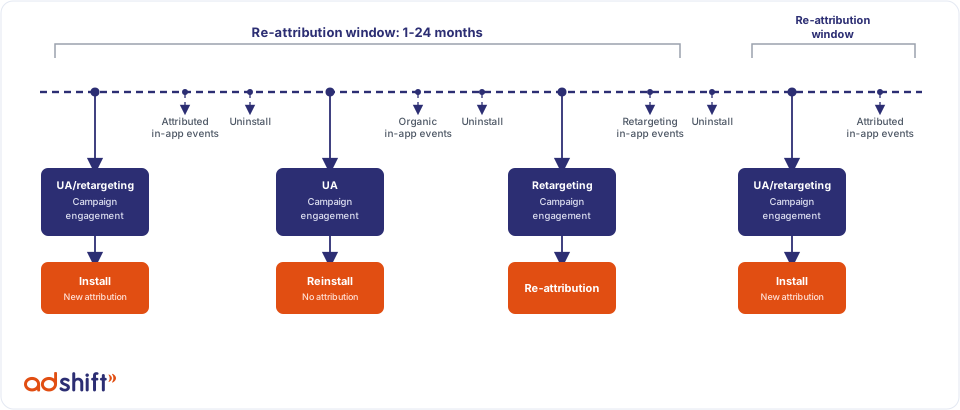
The timeline above walks through the four outcomes a (re)install can have.
1. First install
A user who never had the app engages with a user-acquisition or retargeting campaign and installs.
- A new install is attributed to the media source (or organic, if no engagement was recorded).
- A new re-attribution window starts.
- Install and in-app-event postbacks are sent to the attributed media source, when configured.
- Subsequent in-app events are attributed to the same media source.
2. Reinstall (no new attribution)
After the first install, the user uninstalls and reinstalls inside the window without engaging a retargeting campaign (or after engaging only a UA campaign).
- The install is not attributed — it doesn't appear in dashboards or data.
- No install postback is sent to any media source.
- Depending on your reinstall-events attribution setting, that user's later in-app events are credited either to organic or to the original install.
3. Re-attribution
After the first install, and inside the window, the user uninstalls, engages with a retargeting campaign, and reinstalls. This is a re-attribution.
- The install is attributed to the retargeting media source and appears in the retargeting (and unified) views — not in the user-acquisition view.
- All following in-app events are attributed to the retargeting media source.
- An install postback is sent to the retargeting media source.
- A fresh re-attribution window starts from this install.
4. New install
The user uninstalls and reinstalls after the window has ended. This is treated as a brand-new first install, with the same results as case 1: a new install (or organic) is attributed, a new window starts, postbacks are sent, and following in-app events inherit the new source.
Related
- Attribution model — how installs are attributed in the first place.
- Re-engagement vs re-attribution — how retargeting reinstalls and retargeting app-opens are measured, including the windows involved.