

Measure push notification re-engagement
Use RightLinks in push notifications to bring users back and measure the return as re-engagement.
Push notifications are a great way to bring existing users back into your app, and a RightLink lets you measure that return as re-engagement credited to the push campaign that drove it.
Push works differently from a normal link. You don't set the RightLink as the notification's tap URL — instead you put it inside the notification's custom data, and your app hands it to the AdShift SDK when the user taps. That last part needs a one-time developer setup.
Requires a developer step + push-capable SDK
This flow depends on the AdShift SDK reading the RightLink from your push payload. Your developer integrates this once (see the developer guide). Make sure your app uses an SDK version with push-notification support (iOS and Android are both supported) before relying on push attribution.
How it works
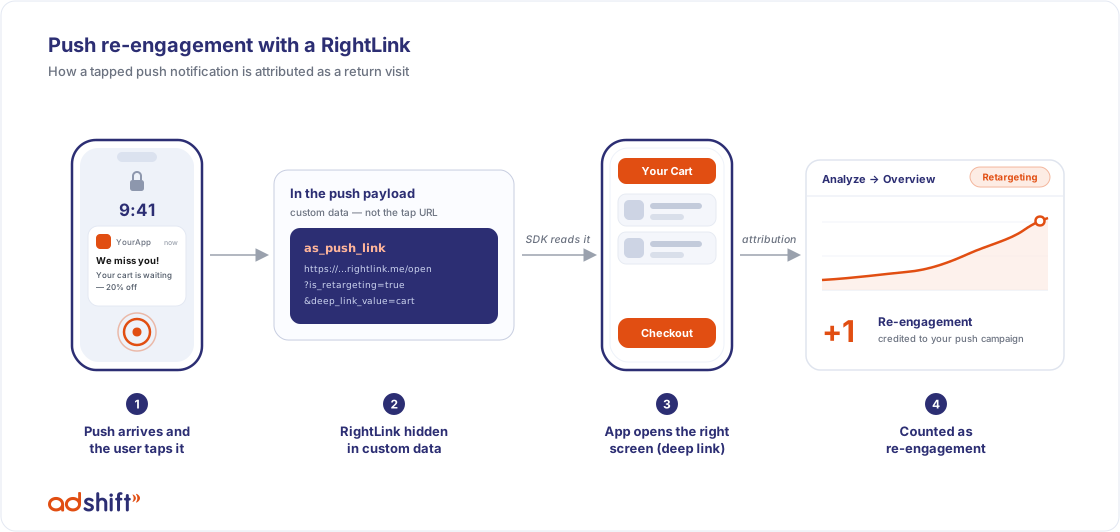
- You create a RightLink set up for retargeting and copy its full link URL.
- In your push tool (e.g. Firebase), you add that URL to the notification's custom data under an agreed key — we recommend
as_push_link. - A user taps the push. The app loads and passes the payload to the AdShift SDK.
- The SDK reads the link, opens the right screen (your deep link value), and sends the attribution.
- AdShift credits the visit as re-engagement from your push campaign. Results appear under Analyze → Overview in the Retargeting view.
Prerequisites
- The AdShift SDK integrated with push support, and the developer step done (forwarding the tapped notification to the SDK). See the developer guide.
- A RightLink set up for retargeting (see the onboarding guide).
- Re-engagement attribution configured in your App Settings (re-engagement section with the inactivity window).
Step 1: Create the retargeting RightLink
- In Engage → RightLink Management, create a link (Custom experience) and set a media source and campaign name. Use a media source / campaign naming that lets you recognize push campaigns in reports (e.g. media source
push_provider, campaignwinback_q3). - In Retargeting settings, turn on Retargeting and Ignore active users for retargeting, and set your Re-engagement window (how long after the tap the user's activity stays credited to this campaign).
- Set the Deep link value for the screen you want to open (e.g.
cart).
Finish the retargeting settings before you copy the URL.
The retargeting flag and windows are carried inside the link URL itself. If you change these settings later, copy the URL again and update it in your push tool — pushes already sent keep the old settings.
Step 2: Copy the link URL
Copy the full (long) link URL with the Copy button — the one that contains parameters like pid=, c= and is_retargeting=true.
Short links work too.
The short link (
https://yourbrand.rightlink.me/sXXXXXXXXXXXXXX, the same URL used in QR codes) is also fully attributed, as long as the app runs an SDK version with short-link support. It has a practical upside: it always reflects the link's current settings, so editing retargeting settings after scheduling the push does not require updating the payload. (The app looks up the campaign at tap time, so a tap made with no connectivity at that exact moment won't be attributed — a rare case, since the app needs the network anyway.)
Step 3: Add the link to your push notification
In your push provider, add the copied URL to the notification's custom data (sometimes called "additional data" or "custom key-value pairs") — not as the notification's destination/tap URL:
- Key:
as_push_link(recommended — the SDK looks for this key out of the box) - Value: the full RightLink URL you copied
Firebase console example (Additional options → Custom data):
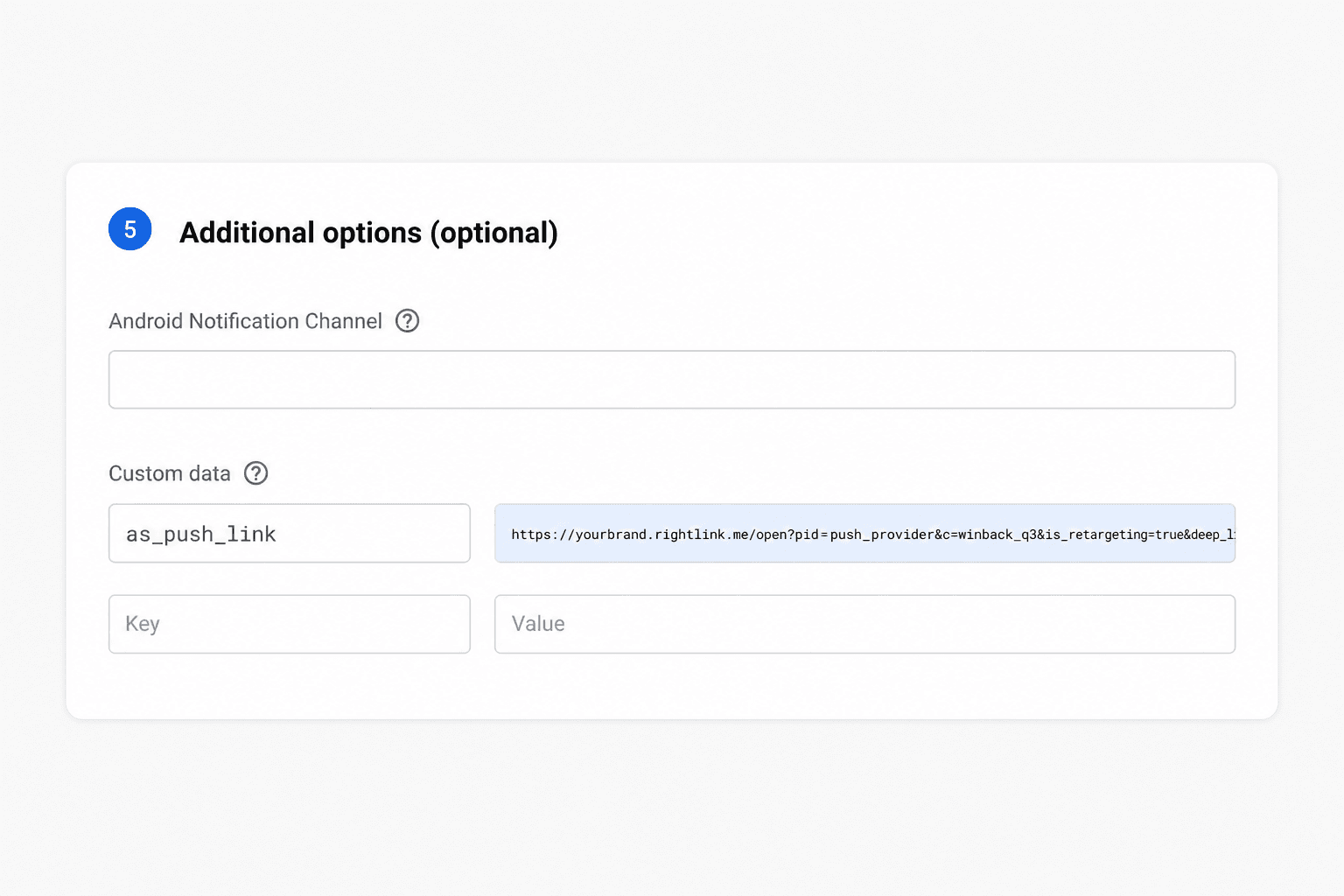
| Key | Value |
|---|---|
as_push_link |
https://yourbrand.rightlink.me/open?pid=push_provider&c=winback_q3&is_retargeting=true&deep_link_value=cart |
Using a different key name?
If you can't use
as_push_link, agree on the key name with your developer — the SDK must be configured to read your custom key (a one-line change on their side). Withas_push_link, no extra configuration is needed.
Step 4: Test
- Send yourself the push (your provider's test-send option works fine) on a device that already has the app installed.
- Tap the notification. The app should open on the screen from your deep link value.
- After a few minutes, check Analyze → Overview with the Retargeting view, filtered by your media source / campaign — the visit should appear as a re-engagement.
How the visit is attributed
- The user already has the app → their return is credited as re-engagement, not a new install.
- Their activity stays attributed to your push campaign for the duration of the re-engagement window. Further taps or opens inside the window count as re-opens of the same re-engagement — not new conversions.
- If the same push payload reaches the app more than once, it is deduplicated and counted once.
- Push re-engagement does not require iOS tracking consent (ATT) — it works without device advertising IDs.
- You don't add device IDs to the link — the SDK identifies the device. (Device IDs in the link only matter for paid retargeting through external networks; see the RightLinks overview.)
Running several retargeting campaigns at once?
Attribution is last-touch: each tap moves the credit to the most recent campaign. If you run multiple push/retargeting campaigns in parallel and want to stop them from taking credit from each other on every tap, set Minimum time between re-engagement conversions in your App Settings (re-engagement attribution section).
Troubleshooting
- Nothing is attributed — most common causes, in order:
- The link was set as the notification's tap URL instead of placed in custom data.
- The key name in the push doesn't match what the SDK is configured to read (use
as_push_link, or confirm the custom key with your developer). - The developer step isn't in place, or the app runs an SDK version without push support (short links additionally require a version with short-link support).
- A short link was used and the device was offline at tap time — the campaign lookup needs a brief internet connection (Step 2).
- Attributed as a plain open, not re-engagement — check that Retargeting and Ignore active users for retargeting are on for the link, that you copied the URL after enabling them, and review the re-engagement settings in App Settings. Note that users who were recently active may be excluded by the inactivity window — that's the Ignore active users setting working as intended.
- Wrong screen after tapping — the deep link value doesn't match what your app routes on.
- Two campaigns keep switching the credit — expected with last-touch attribution; see the tip above about Minimum time between re-engagement conversions.
See also
RightLinks onboarding
Step-by-step setup for marketers: create a template, create a link, test it, and measure your results.
My dashboards — what each one is for
A quick map of AdShift's Analyze dashboards — what each one is for, who it's for, and when to use it. Start at Overview, then dive into the detail.