

What is SKAN?
Apple's privacy-first attribution for iOS, explained — and how AdShift makes it useful.
SKAdNetwork (SKAN) is Apple's privacy-first way to measure iOS ad campaigns. It tells you which campaigns drive installs and value — without identifying individual users, without the IDFA, and without needing App Tracking Transparency (ATT) consent.
The trade-off for that privacy is simple: instead of a detailed record per user, Apple gives you aggregated, anonymized signals with a deliberate delay. AdShift's job is to collect those signals, make sense of them, and show them next to the rest of your marketing data.
This is a practical primer — enough to feel confident using SKAN in AdShift, not a full specification. SKAN is Apple's framework, so the deep mechanics are Apple's to define (see Apple's SKAdNetwork documentation). Our job as your MMP is to collect it, verify it, decode it, and make it usable. For the numbers themselves, see the SKAN Overview dashboard; to decide what your signals measure, see SKAN Conversion Studio.
SKAN applies to iOS apps only.
Why SKAN exists
Since iOS 14.5, an app can't access the device advertising identifier (IDFA) for a user who hasn't granted ATT permission — and most users don't. Without an identifier, the old model of "match this install to that exact ad click" breaks down for a large share of iOS traffic.
SKAN is Apple's answer: a way to still credit campaigns, but with the measurement done by Apple, in aggregate, so no single user can be tracked across apps.
How it works, at a glance
The key thing to understand: on SKAN, the install signal comes from Apple — not from the AdShift SDK. When someone installs your app after seeing an ad, iOS itself creates a short, signed message called a postback.
User installs after seeing an ad → iOS creates a signed postback → Apple sends a copy to the ad network, and a copy to AdShift → AdShift verifies and decodes it → SKAN Overview dashboard
AdShift receives its own copy of the postback directly from Apple (you enable this once during SDK setup), checks Apple's signature to confirm it's genuine, and translates it into installs and value you can read on the dashboard.
Each postback carries a small number — a conversion value — plus which campaign it belongs to. That number is the heart of SKAN.
Conversion values: the number SKAN reports
A conversion value on its own is just a number. What it means — whether it stands for a revenue tier, a level reached, or a completed purchase — is something you define in SKAN Conversion Studio. The AdShift SDK sets the right value on each install automatically, and the dashboard decodes it back into revenue and events.
Apple sends the value in one of a few forms, depending on how much traffic a campaign has:
- Fine — a precise value from 0 to 63. Only sent when a campaign has enough installs to keep users anonymous.
- Coarse — a simple bucket: low, medium, or high. Always available, even for smaller campaigns.
- Null — when volume is below Apple's privacy threshold, the value is withheld entirely.
A high share of null values usually means your campaigns are too small for Apple to report on individually — consolidating campaigns can help.
The three measurement windows
SKAN 4 doesn't report once — it measures the post-install period in three separate windows, and can send a postback after each one. The windows don't overlap: each covers its own slice of time.
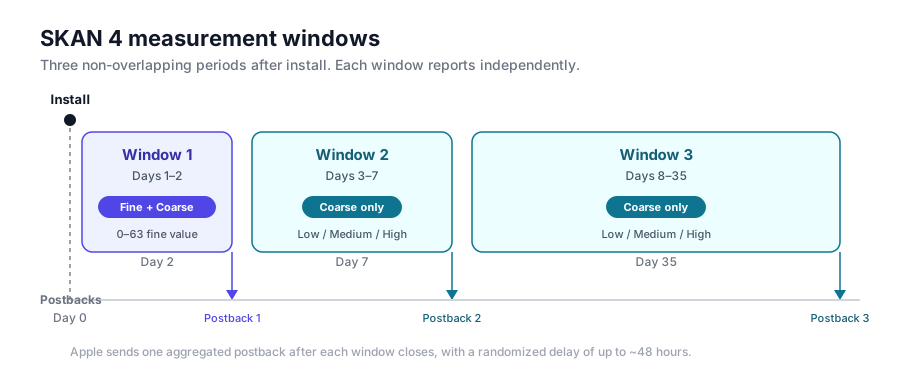
| Window | Period after install | What you get |
|---|---|---|
| Window 1 | Days 1–2 | A fine value (0–63) and a coarse value |
| Window 2 | Days 3–7 | A coarse value |
| Window 3 | Days 8–35 | A coarse value |
Only the first window carries the precise fine value; the later two report a coarse bucket. This is why early value signals (like first-session revenue) go in Window 1, while longer-term signals (like week-2 retention) land in the later windows.
How AdShift makes SKAN useful
SKAN gives you raw, privacy-safe signals. AdShift turns them into decisions across three places:
- SKAN Conversion Studio — you decide what your conversion values measure (revenue, events, a funnel), without changing app code.
- SKAN Overview dashboard — read decoded installs, revenue, and campaign performance, with diagnostics for how trustworthy the SKAN signal is.
- Single Source of Truth (SSOT) — where a paid install was measured both by SKAN and by AdShift's device-level attribution, SSOT removes the duplicate so you get one honest number. You'll see the same concept as a mode on the Analyze: Overview dashboard.
What you need to get started
- The AdShift iOS SDK integrated in your app — see the developer guide.
- The SKAN postback endpoint registered in your app (the
NSAdvertisingAttributionReportEndpointkey inInfo.plist), so Apple sends AdShift its copy of each postback. The SDK setup guide walks you through this. - A published configuration in SKAN Conversion Studio, so your conversion values can be decoded into meaningful revenue and events.
SKAN's limits, in plain terms
A few things to expect — knowing them up front saves a lot of confusion:
- It's delayed. Postbacks arrive on Apple's schedule — the first a few days after install, later windows over the following weeks. Recent-day numbers keep rising as postbacks arrive, and you can't optimize in real time on SKAN alone.
- It's aggregated. You see what a campaign drove, never what a specific user did.
- It covers new installs. Re-engagement and re-attribution stay with AdShift's device-level attribution.
- Some values come back empty (null). Low-volume campaigns fall under Apple's privacy threshold and report no value — consolidating campaigns usually helps.
- It won't match your other numbers exactly — by design. SKAN counts installs Apple's way; the Analyze: Overview dashboard de-duplicates them against device-level attribution. Each answers a slightly different question.
See also
- SKAN Overview dashboard — read your decoded SKAN performance
- SKAN Conversion Studio — configure what your conversion values measure
- Analyze: Overview — unified attribution, including Single Source of Truth