

Resolve retargeting double attribution
To measure how a retargeting campaign performs during its re-engagement window, AdShift double-attributes in-app events: each event is credited to both the media source that drove the original install (UA) and the media source that drove the re-engagement or re-attribution (retargeting). This article explains how that works and how to read it in reports.
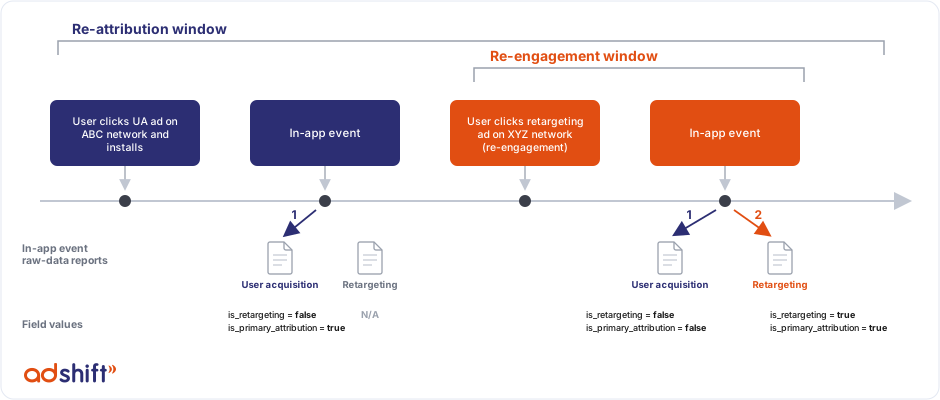
What double attribution is
During a re-engagement window, an in-app event is attributed to two media sources:
- the retargeting source that brought the user back — the primary credit, and
- the original UA source that first acquired the user — the secondary credit.
When and to whom it applies:
- Re-engagements — double attribution applies to all re-engagements.
- Re-attributions — double attribution applies when the app is in first-install mode (AdShift's default), where in-app events from a reinstall are attributed to the original install. In that mode a re-attribution opens a lifetime double-attribution window, like a fresh install.
Double attribution only happens during a re-engagement window, and the secondary (UA) credit only exists when the original install came from a paid UA source. If the original install was organic, there's no UA-secondary credit.
A quick example
A user clicks a UA ad on ABC, installs, and buys for $50. A few days later they click a retargeting ad on XYZ (a re-engagement) and buy for $75.
- The $50 purchase happens before the re-engagement → one record, credited to ABC.
- The $75 purchase happens during the re-engagement window → two records: XYZ as the primary (re-engagement) source, and ABC as the secondary (original install) source.
Attribution relative to the re-engagement window
The fields below identify double-attributed records in raw data:
is_retargeting—truefor the retargeting record.is_primary_attribution—truefor the primary source,falsefor the secondary. (In the warehouse this distinction is also exposed asattribution_role=primary/secondary.)conversion_type—install,re-engagement,re-attribution, orre-install.
| Media source | Before the window | During the window | After the window |
|---|---|---|---|
| User acquisition | Primary · is_primary_attribution: true · conversion_type: install · is_retargeting: false |
Secondary · is_primary_attribution: false · conversion_type: re-engagement · is_retargeting: false |
Primary · is_primary_attribution: true · conversion_type: install · is_retargeting: false |
| Retargeting | N/A | Primary · is_primary_attribution: true · conversion_type: re-engagement · is_retargeting: true |
N/A |
Outside the window, events revert to the UA source as the primary install record (or to organic, if the original install was organic).
Support for dashboard view types
The Overview dashboard (and cohort reports) offer three view types, which apply the same logic as the raw data.
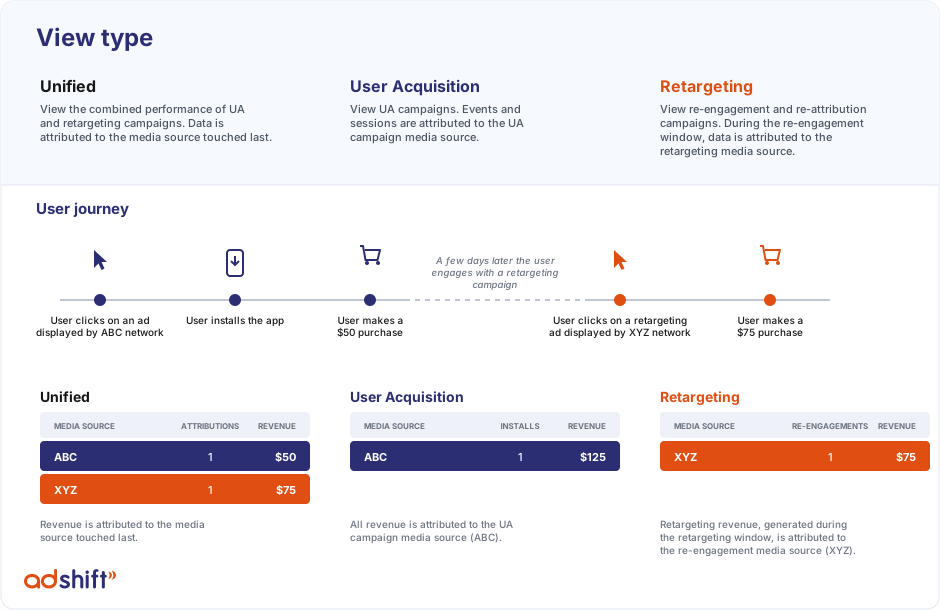
Using the example above (a $50 purchase before, a $75 purchase during the window):
| View type | What it shows | Result |
|---|---|---|
| Unified | Every event counted once, attributed to the last-touch source. | ABC $50 + XYZ $75 = $125 |
| User Acquisition | All events credited to the UA source (including the secondary credit during the window). | ABC = $125 |
| Retargeting | Events credited to the retargeting source during the window. | XYZ = $75 |
Because the same $75 event is credited to both ABC (secondary) and XYZ (primary), User Acquisition + Retargeting can exceed Unified. Unified is the canonical total — it never double-counts. After the window closes, revenue reverts to User Acquisition only.
How each view filters the data
| View type | Filter applied | Effect |
|---|---|---|
| Unified (default) | attribution_role != 'secondary' |
Primary leg of every event, counted once (last touch). |
| User Acquisition | is_retargeting = false |
UA primary (install) plus UA secondary (re-engagement) credit. |
| Retargeting | is_retargeting = true |
The retargeting primary leg only. |
Identifying double-attributed events in UA reports
In User Acquisition in-app event reports, an event produced by double attribution looks like this:
is_primary_attributionis false — the credit is the secondary result of a retargeting campaign, with the UA source as secondary.is_retargetingis always false.
The matching record in the Retargeting report (during the same window) has:
is_primary_attributionalways true, andis_retargetingalways true.
If an event does not occur during a re-engagement window, there's no retargeting record at all — only the UA primary record.
Related
- Retargeting attribution guide — the overview of retargeting.
- Re-attribution window — how reinstalls are classified.
- Attribution model — how installs are attributed in the first place.
Retargeting attribution guide
An overview of retargeting attribution: re-engagement vs re-attribution, the windows involved, double attribution, and how to set up retargeting.
Overview
Create deep links that open the right screen, fall back to the store when the app isn't installed, and credit installs and re-engagement to your campaigns.