

Retargeting attribution guide
An overview of retargeting attribution: re-engagement vs re-attribution, the windows involved, double attribution, and how to set up retargeting.
Retargeting (remarketing) campaigns bring existing users back: they motivate a user to re-open the app, or get a user who deleted the app to reinstall it. This guide explains how AdShift attributes retargeting, the windows and rules involved, and how the results show up in your reports. It builds on the Attribution model and Re-attribution window articles — read those first if the terms below are new.
Retargeting fundamentals
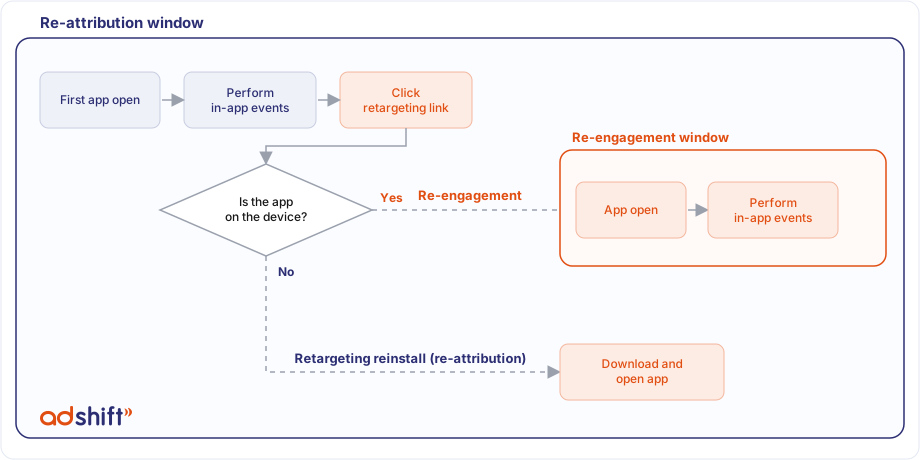
Retargeting attribution happens when a user engages with a retargeting campaign — a click on a retargeting link or a deep link. It produces one of two events:
- Re-engagement — the app is still on the device. The retargeting media source is credited with bringing the user back to open the app.
- Re-attribution (a "retargeting reinstall") — the app is no longer on the device (the user uninstalled it). Engaging with the retargeting campaign leads the user to reinstall and open the app. If this happens inside the re-attribution window, the retargeting media source is credited with the re-attribution.
A retargeting link doesn't always produce retargeting. If a brand-new user — or a user whose re-attribution window has already expired — engages with a retargeting link and installs, that's a regular new install and is credited as user acquisition (UA), not retargeting.
Inclusion and exclusion windows
Retargeting rules are built from two kinds of windows:
- Inclusion windows — periods during which a re-engagement can be recorded.
- Exclusion windows — periods during which a re-engagement (or re-attribution) can't be recorded.
Inclusion windows
| Window | What it limits | Where it's set | Default |
|---|---|---|---|
| Click lookback | Max time from an ad click to the app open. | Retargeting link | 7 days (configurable, up to 30 days) |
| View-through lookback | Max time from an ad view (impression) to the app open. | Retargeting link | 1 day (configurable) |
| Re-engagement window | How long after the re-engagement in-app events are credited to the retargeting source. | Retargeting link (App Settings for self-reporting networks) | 30 days (can be set in hours, up to 90 days, or lifetime) |
Exclusion windows
| Window | What it does | Where it's set | Default |
|---|---|---|---|
| Inactivity window (minimum inactivity period) | Don't record a re-engagement or re-attribution unless the user has been inactive (no app opens) for at least this long. Recently active users keep their current attribution. | App Settings (and per-link "Ignore active users for retargeting") | None — 0 disables it |
| Minimum time between re-engagement conversions | After a re-engagement, ignore further re-engagements for this period (see "last wins" below). | App Settings | None |
The exclusion windows don't affect the time between install and re-engagement — only whether a new re-engagement is recorded.
The re-engagement window and double attribution
The re-engagement window begins when the user first opens the app after engaging with the retargeting source. While it's open, AdShift double-attributes in-app events:
- a primary credit to the retargeting media source, and
- a secondary credit to the original UA media source, if the user was originally acquired by a paid source.
This is what powers the view types in the Overview dashboard:
During a retargeting re-engagement window, in-app revenue is double-attributed: it's credited to both the retargeting source (Retargeting view) and the original acquisition source (User Acquisition view). So User Acquisition + Retargeting can exceed Unified — Unified counts each event once and is the canonical total. After the window closes, revenue reverts to User Acquisition only.
A few rules govern the window:
- "Last wins" by default. If another network or campaign brings a re-engagement while the window is open, the current window closes, a new re-engagement is recorded, and later events go to the most recent one. To prevent this, set Minimum time between re-engagement conversions — a new re-engagement is then only recorded after that time has elapsed.
- Re-attribution opens a lifetime window. For a re-attribution (a retargeting reinstall), the double-attribution window is unlimited in time, like a fresh install. It ends only on a new install/reinstall or due to data-retention limits.
- Changing the window applies going forward. Editing the re-engagement window affects new re-engagements only; it doesn't change windows that are already open.
Re-engagement rules checklist
An engagement is attributed as a re-engagement only if all of these hold:
| Rule | |
|---|---|
| A | The user engaged with a retargeting campaign (viewed or clicked a retargeting ad / link). |
| B | The engagement was within the click-lookback or view-through window. |
| C | The user was inactive longer than the inactivity window. |
| D | For in-app events: they occur during the re-engagement window. |
| E | The gap since the previous re-engagement is greater than the minimum time between re-engagement conversions. |
Setting up retargeting
In App Settings:
- Turn on Re-engagement attribution.
- Optionally set the Inactivity window and Minimum time between re-engagement conversions.
- For re-attributions, make sure reinstall-events attribution is configured so reinstalls inside the re-attribution window are credited to the retargeting source.
On the link: create a RightLink with retargeting enabled, set its re-engagement window, and (optionally) Ignore active users for retargeting with an inactivity window. Hand that link to the ad network or use it in your owned channels (push, SMS, social). Self-reporting networks (e.g., Meta, Google, TikTok) report re-engagements through their own integration instead of a link.
Where to see retargeting data
In Analyze → Overview, use the View type selector:
- User Acquisition — installs and their UA-credited events (plus UA-secondary credit during re-engagement windows).
- Retargeting — re-engagements, re-attributions, and the events credited to retargeting sources.
- Unified — every event counted once; the canonical total.
Retargeting in-app events and sessions are double-attributed, which is why User Acquisition + Retargeting can exceed Unified. Re-engagements and re-attributions also appear in the raw conversion data, where the conversion type distinguishes re-engagement, re-attribution, and re-install.
FAQ
What counts as a retargeting click? A user engaging with an AdShift retargeting link. Some of these clicks lead to new installs that are attributed as user acquisition — this happens when a non-user, or a user past their re-attribution window, engages with a retargeting link and installs.
When is the engagement time the same as the install time? When a user opens the app directly through Universal Links (iOS) or App Links (Android), they reach the app without passing through AdShift first. When the app launches and the SDK reports the re-engagement, AdShift uses the launch timestamp for the engagement, so the two times line up.
Related
- Attribution model — how installs are attributed.
- Re-attribution window — how reinstalls are classified.
- Re-engagement vs re-attribution — the two retargeting outcomes, with worked examples.