

SDK Information
See which app, SDK and OS versions your users are running, what devices they use, and how ATT consent is trending on iOS. The page to check before you drop support for an old version or ship a privacy change.
SDK Information
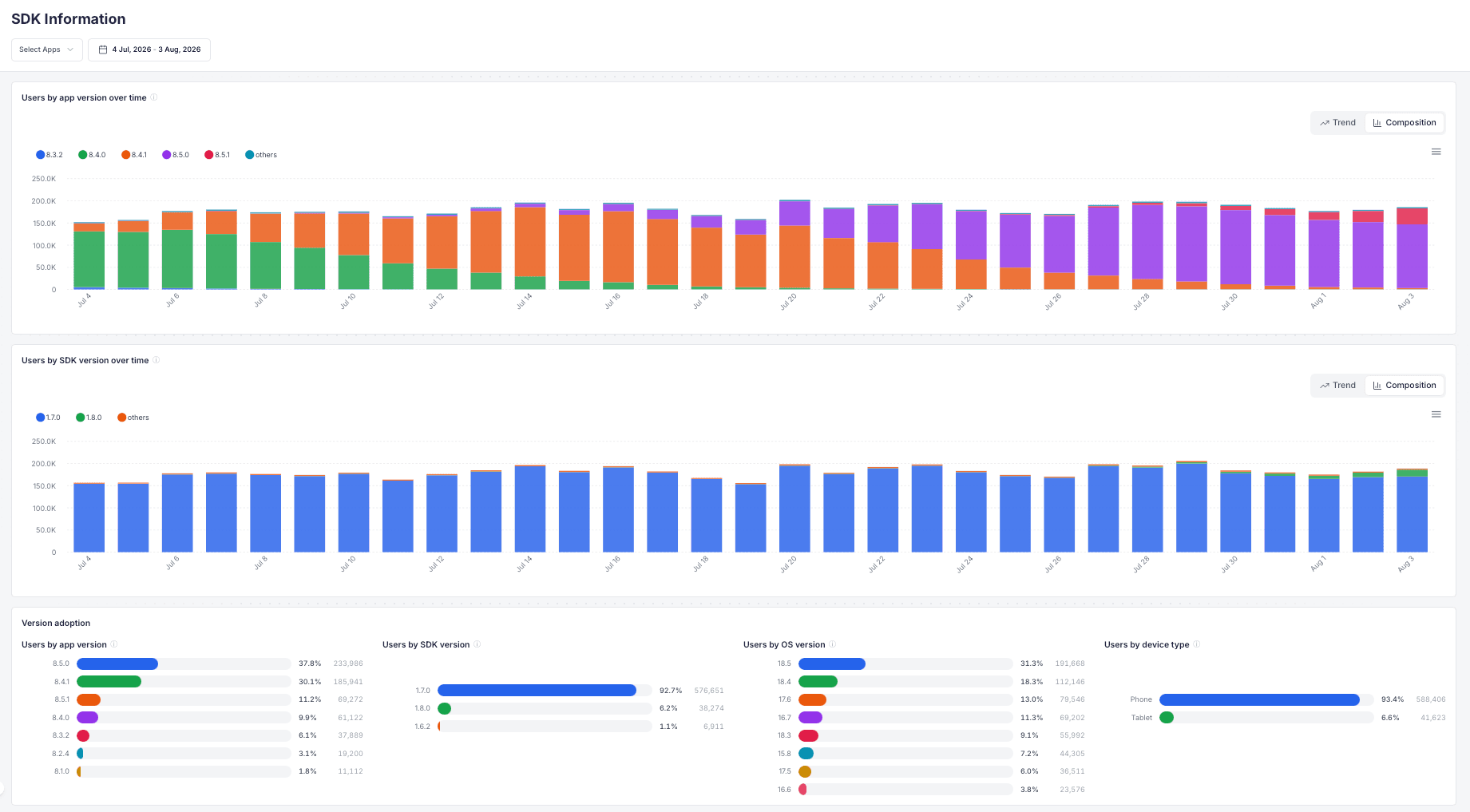
SDK Information is about your installed base rather than your marketing. It shows which app version people are actually running, how fast they pick up a new release, which AdShift SDK version is measuring them, what devices and OS versions you're dealing with, and on iOS how many users allow tracking.
Open it from Settings → SDK → SDK Information.
Typical questions it answers:
- Can I stop supporting app version 6.4 yet, or is a chunk of my users still on it?
- Did the release I shipped on Monday actually reach people, or did the rollout stall?
- Is the new AdShift SDK live in production, so I can rely on the features that came with it?
- How many of my iOS users say yes to the ATT prompt, and did that change after I moved the prompt?
- How much of my iOS base is on 16.1 or newer, ready for SKAN 4?
How the numbers are counted
One app at a time. App versions belong to an app. Version 6.5.0 of your shopping app has nothing to do with version 6.5.0 of your game, so adding them together would produce a number that means nothing. The picker takes one app, and the platform comes from the app itself, so there's no platform filter to set.
A user counts once per day. Someone who opens the app five times is still one user. They count under the version from their most recent app open that day, so a person who updates at lunchtime lands in the new version rather than in both.
Totals over a range are de-duplicated. Over a 30-day range, a user active on 20 of those days is still one user. That de-duplication is a statistical estimate with roughly a 1–2% margin, the same method used for unique users elsewhere in AdShift (see Unique users). Day-by-day charts are exact counts.
The page is built once a day. Metrics are aggregated in a nightly run, so today's activity shows up after the next build. History goes back about three months.
Version adoption
Users by app version over time · Users by SDK version over time
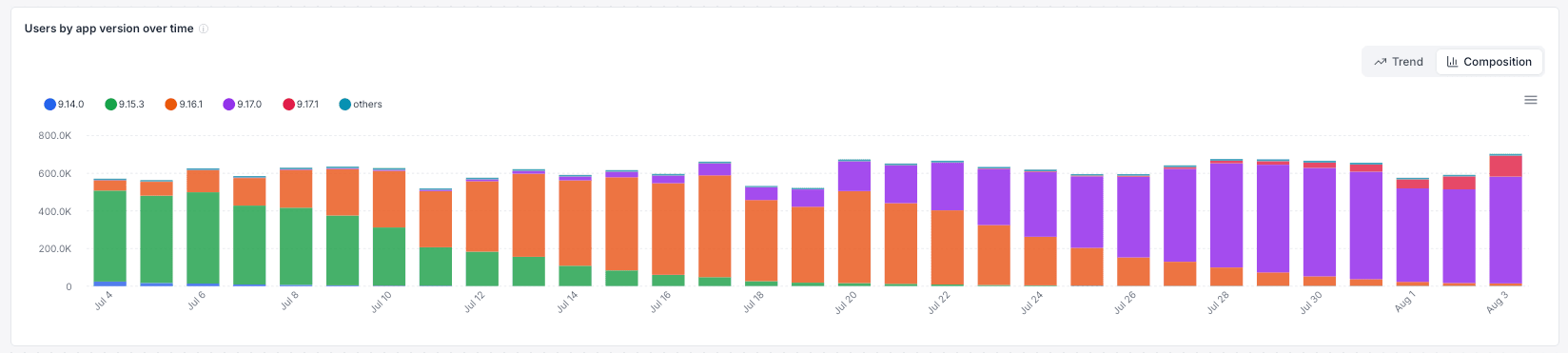
The two charts at the top show daily unique users split by version, so you can watch a release spread through your base day by day, one color taking over from another.
Each chart has a toggle in its top-right corner:
| Mode | What it's good for |
|---|---|
| Composition (default) | How your base splits across versions on each day. The stack runs oldest version at the bottom, newest on top. |
| Trend | A single version's own path. Click a version in the legend to isolate it and see whether it's still climbing or already fading. |
Up to eight versions get their own color and the rest are grouped as others. The eight are picked by their biggest single day, not by their total over the range, so a version that held a large share briefly and was then pulled stays visible instead of vanishing into the group.
The distribution panels
Below the charts, four panels rank the selected period as a whole, with device models in a panel of their own:
| Panel | What it shows |
|---|---|
| Users by app version | Your release mix. This is the number to check before dropping support for an old version. |
| Users by SDK version | Which AdShift SDK versions are live. New SDK features only apply to users on a version that has them. |
| Users by OS version | iOS and Android versions, at major.minor granularity. |
| Users by device type | Phone vs tablet. |
| Top device models | The most common devices, with rare ones grouped as Other models. |
Two labels need explaining. Under device type, Android devices running an older AdShift SDK appear as Not reported (older SDK): the form factor wasn't collected back then and can't be reconstructed afterwards. That bucket shrinks on its own as your app ships a newer SDK. Under device models, older iOS traffic shows the device family (iPhone, iPad) instead of the exact model for the same reason, and precise models appear as newer SDK versions roll out.

ATT & Consent (iOS)
This section only appears for iOS apps, since App Tracking Transparency doesn't exist on Android.
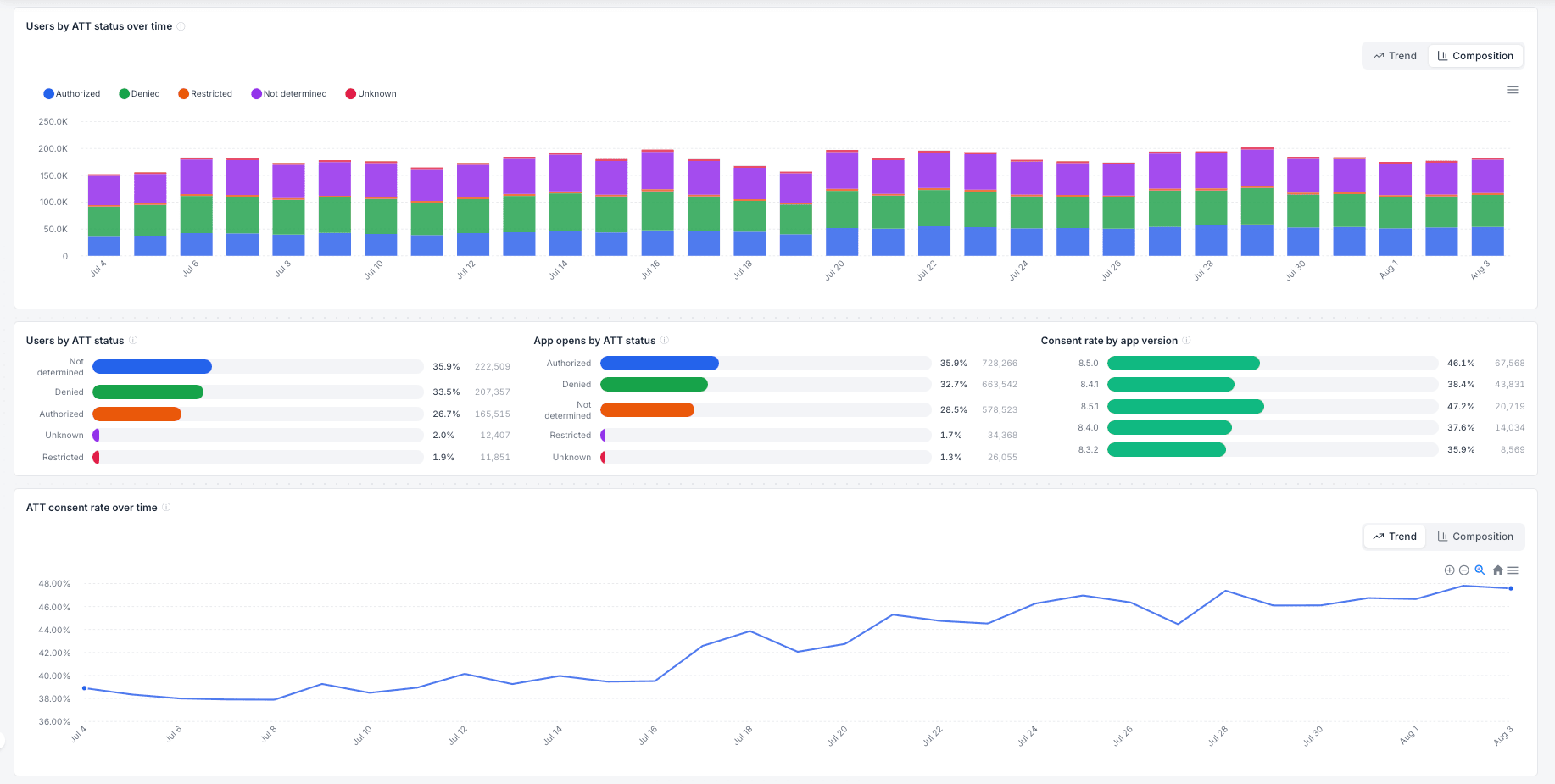
Apple's prompt puts every device into one of these states, and AdShift records the state from the user's most recent app open:
| Status | Meaning |
|---|---|
| Authorized | The user tapped Allow. The IDFA is available. |
| Denied | The user tapped Ask App Not to Track. |
| Not determined | The prompt hasn't been shown yet, or the user hasn't answered it. |
| Restricted | The device can't show the prompt at all, typically because of parental restrictions. |
| Unknown | No status was reported, usually an older SDK version. |
Consent rate is the share of users who allowed tracking among those who answered: authorized ÷ (authorized + denied). Users who were never asked don't drag the number down, which makes it comparable across periods where you showed the prompt to different shares of your base. Days on which nobody answered are left out of the trend rather than drawn as zero.
The panels:
- Users by ATT status over time — the daily composition of your iOS base by status. This is where a prompt change shows up: the authorized band widens or narrows from the day the new build lands.
- Users by ATT status — the same split for the whole selected period.
- App opens by ATT status — the same split weighted by activity instead of by people. Compare it with the panel above: if the authorized share is higher here, your consenting users are also your more engaged ones.
- Consent rate by app version — consent per app version, side by side. Useful for judging a change to prompt copy, timing or the pre-prompt screen, because both versions run at once while the rollout progresses.
- ATT consent rate over time — one line, worth watching after any change to how you ask.
- iOS 16.1+ adoption (SKAN 4 capable) — the share of your iOS users on 16.1 or newer. SKAN 4 postbacks require it, so this is the ceiling for your SKAN 4 coverage. See What is SKAN? for what that unlocks.
Use cases
Deciding when to drop a version. Open Users by app version and set the range to the last 7 days. Old versions rarely reach zero, so what you're looking for is the point where the remaining share is small enough to accept the cost of cutting it.
Checking a rollout. Watch Users by app version over time in Composition mode for the days after a release. A band that grows and then flattens early usually means the store rollout is throttled or paused, not that users refused the update.
Confirming an SDK upgrade landed. After you ship a build with a new AdShift SDK, Users by SDK version should start shifting within days. Until it does, anything that depends on that SDK version applies to only part of your traffic.
Testing a consent prompt. Ship the new prompt in a new app version, let both versions run, and compare them in Consent rate by app version. Since the two run at the same time, seasonality and traffic mix affect both equally, which a before-and-after look at the trend line can't promise.
Planning for SKAN 4. Check iOS 16.1+ adoption before you assume SKAN 4 coverage. The rest of your iOS base still reports on the older protocol.
Limitations and things to know
- The page is built once a day. Today's numbers appear after the next nightly aggregation, and an app that just started sending data shows nothing until then.
- History goes back about three months. That covers the release and adoption decisions this page is meant for.
- Users without a stable device identifier aren't counted. The dashboard reports on devices the SDK can identify, so these totals answer "what is my identifiable base running", not "how many downloads exist".
- Grouped buckets hold real users. Others on the charts and Other models in the device panel are grouped only to keep a chart readable, not because the users are unimportant.
- Older SDK versions report less. Device type on Android and exact device models on iOS arrived with newer SDK versions. Those gaps aren't filled in retroactively; they close as your base upgrades, which you can watch happening on this page.
See also
- Unique users — how a user is counted once
- What is SKAN? — why iOS 16.1+ and ATT matter for iOS measurement
- SKAN Overview — the iOS performance dashboard this one supports
- Analyze dashboards — what each one is for — which dashboard answers which question
Overview – Main Dashboard
Your daily marketing pulse: see spend, installs, revenue and ROAS across every channel and app in one place — with comparison charts, a drill-down table, and shortcuts into the detail.
SKAN Overview
Read your iOS SKAdNetwork results — decoded installs and revenue, with diagnostics for how trustworthy the SKAN signal is.